 Rohan Verma
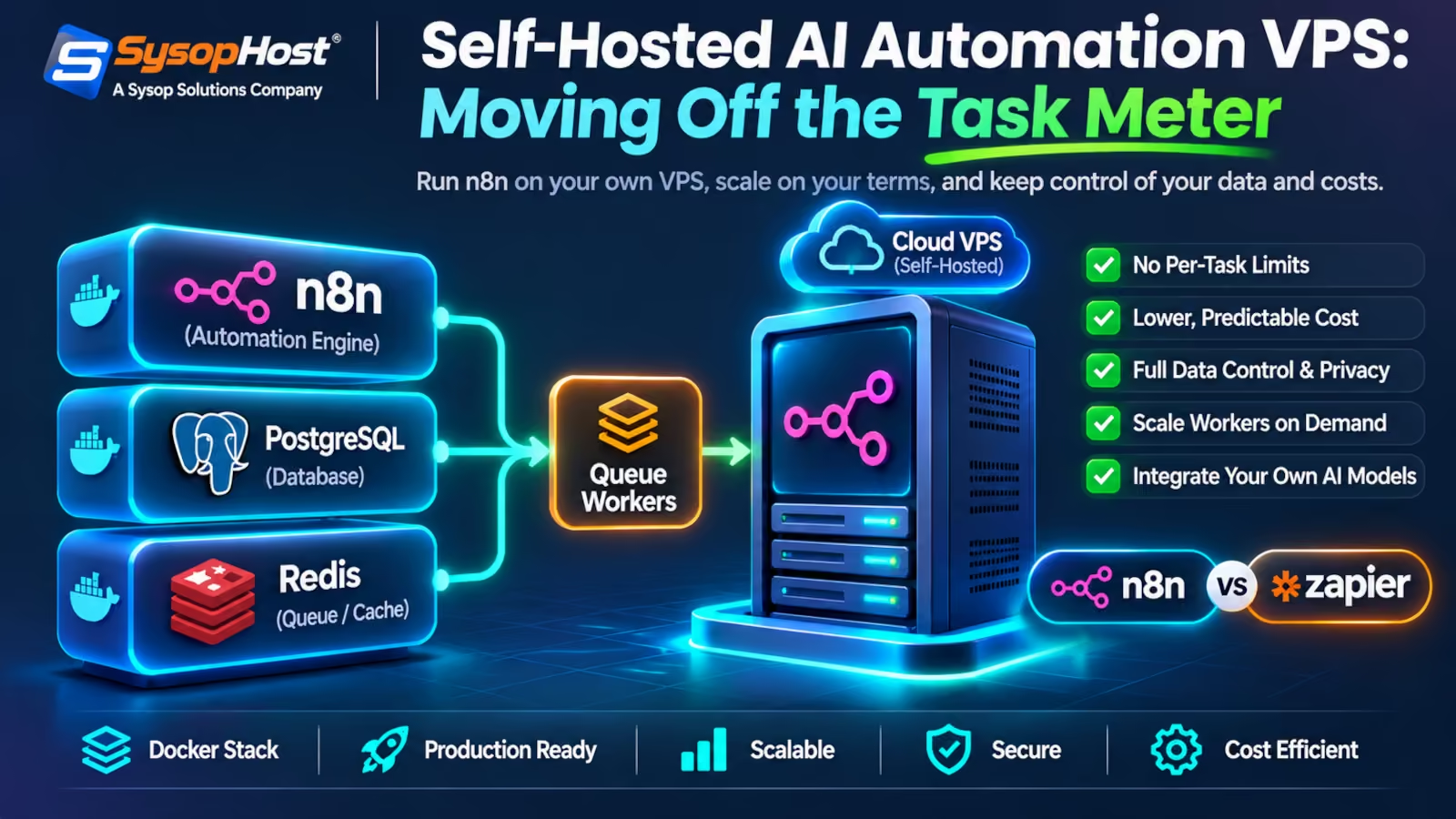
Per-task pricing was built for three-step zaps, not eleven-step agent loops. This walks through the production n8n stack: main process, Redis broker, workers, PostgreSQL, plus the environment variables that quietly fill a disk, and the cases where the SaaS plan is still the cheaper answer.
Count the steps in your busiest workflow. A support agent that opens a ticket, looks up the order, reads two knowledge-base pages, drafts a reply, and revises that reply twice is about eleven steps. On a per-task plan, that is eleven billable units per ticket. At 15,000 tickets a month it is 165,000 units, and nothing changed except that the workflow started working well.
That arithmetic is the argument for a self hosted ai automation vps. It is not open-source idealism. A looping workflow bills per loop on a metered platform, while the machine underneath it costs the same whether it runs ten jobs or ten thousand.
The counter-argument deserves equal time. A VPS is a server you now own. PostgreSQL upgrades, Redis restarts, certificates, backups, and a stalled queue at 2 a.m. all land on your team. If your automation is four simple triggers and a few hundred runs a month, the SaaS plan is cheaper and you should keep it. The maths flips when the loop count is high and the workflow earns money.
Why per-step billing and agent loops pull in opposite directions
Metered automation platforms price the unit that is easiest to count: one node, one task, one step. That model fit the work it was designed for. A webhook arrives, a row is written, a notification goes out. Three units, predictable, cheap.
Agentic workflows broke the shape of that unit. A retrieval step, a classification step, a tool call that fails, a retry with a corrected argument, a critique pass, a rewrite: each is a node, so each is a unit. The better the agent gets at self-correction, the more units it burns. You are paying a platform for the privilege of looping.
Three constraints usually decide the migration on their own:
The billing unit scales with reasoning depth, not with business value.
Execution time limits on hosted plans were written for webhooks, not for a 12-minute document analysis.
Concurrency ceilings throttle exactly the moment a batch of documents or orders arrives at once.
Self-hosting moves all three onto hardware you provision. Postgres on NVMe, a Redis broker, and as many worker containers as the box can hold.
The four containers that carry the load
n8n in queue mode splits into a main process and a pool of workers, with Redis passing execution IDs between them. The main instance handles triggers, timers and webhook calls, creates the execution record, and drops the execution ID onto a Redis queue. A free worker picks up the message, pulls the workflow definition from PostgreSQL, runs it, writes results back, and tells Redis it finished [1].
Incoming webhook ──► Caddy (TLS, headers) ──► n8n main (creates execution)
                                                    │
                                                    ▼
                                        Redis queue (Bull)
                                                    │
                              ┌─────────────────────┴──────────────┐
                              ▼                                    ▼
                     n8n worker 1                          n8n worker N
                              │                                    │
                              └───────────────┬────────────────────┘
                                              ▼
                              PostgreSQL: executions, credentials, state
That split is what makes the self hosted ai automation vps cheap to grow. Webhook ingestion is light and stays on one process. The expensive part, the model calls and the document parsing, spreads across worker containers that you add or remove in seconds.
A compose file that survives contact with production
The stack below runs on any current Linux VPS with Docker and the compose plugin, including a Docker hosting plan where the runtime is already installed and firewalled. Postgres and Redis stay on an internal bridge network with no published ports; only Caddy faces the internet.
services:
  postgres:
    image: postgres:16-alpine
    restart: always
    environment:
      POSTGRES_USER: ${POSTGRES_USER}
      POSTGRES_PASSWORD: ${POSTGRES_PASSWORD}
      POSTGRES_DB: ${POSTGRES_DB}
    volumes: ["pgdata:/var/lib/postgresql/data"]
    healthcheck:
      test: ["CMD-SHELL", "pg_isready -U ${POSTGRES_USER} -d ${POSTGRES_DB}"]
      interval: 5s
      retries: 10
    networks: [automation]

  redis:
    image: redis:7-alpine
    restart: always
    command: ["redis-server", "--appendonly", "yes", "--requirepass", "${REDIS_PASSWORD}"]
    volumes: ["redisdata:/data"]
    healthcheck:
      test: ["CMD", "redis-cli", "-a", "${REDIS_PASSWORD}", "ping"]
      interval: 5s
      retries: 10
    networks: [automation]

  n8n:
    image: docker.n8n.io/n8nio/n8n:latest
    restart: always
    ports: ["127.0.0.1:5678:5678"]
    environment:
      DB_TYPE: postgresdb
      DB_POSTGRESDB_HOST: postgres
      DB_POSTGRESDB_DATABASE: ${POSTGRES_DB}
      DB_POSTGRESDB_USER: ${POSTGRES_USER}
      DB_POSTGRESDB_PASSWORD: ${POSTGRES_PASSWORD}
      EXECUTIONS_MODE: queue
      QUEUE_BULL_REDIS_HOST: redis
      QUEUE_BULL_REDIS_PASSWORD: ${REDIS_PASSWORD}
      N8N_ENCRYPTION_KEY: ${N8N_ENCRYPTION_KEY}
      N8N_CONCURRENCY_PRODUCTION_LIMIT: "8"
      EXECUTIONS_TIMEOUT: "900"
      EXECUTIONS_TIMEOUT_MAX: "3600"
      WEBHOOK_URL: https://${DOMAIN_NAME}/
    volumes: ["n8ndata:/home/node/.n8n"]
    depends_on:
      postgres: {condition: service_healthy}
      redis: {condition: service_healthy}
    networks: [automation]

  worker:
    image: docker.n8n.io/n8nio/n8n:latest
    restart: always
    command: ["n8n", "worker"]
    environment:
      DB_TYPE: postgresdb
      DB_POSTGRESDB_HOST: postgres
      DB_POSTGRESDB_DATABASE: ${POSTGRES_DB}
      DB_POSTGRESDB_USER: ${POSTGRES_USER}
      DB_POSTGRESDB_PASSWORD: ${POSTGRES_PASSWORD}
      EXECUTIONS_MODE: queue
      QUEUE_BULL_REDIS_HOST: redis
      QUEUE_BULL_REDIS_PASSWORD: ${REDIS_PASSWORD}
      N8N_ENCRYPTION_KEY: ${N8N_ENCRYPTION_KEY}
      N8N_CONCURRENCY_PRODUCTION_LIMIT: "4"
    volumes: ["n8ndata:/home/node/.n8n"]
    networks: [automation]

  caddy:
    image: caddy:2-alpine
    restart: always
    ports: ["80:80", "443:443"]
    volumes:
      - ./Caddyfile:/etc/caddy/Caddyfile:ro
      - caddydata:/data
    networks: [automation]

volumes: {pgdata: {}, redisdata: {}, n8ndata: {}, caddydata: {}}
networks:
  automation:
    driver: bridge
Two details in that file matter more than the rest. The worker needs the same N8N_ENCRYPTION_KEY as the main instance, because credentials are decrypted from the database at execution time and a mismatch produces failures that look like bad API keys. And EXECUTIONS_MODE: queue with a SQLite database is explicitly not recommended by the n8n documentation, which is the single most common way a first migration goes wrong.
Caddy handles certificates without a cron job: a two-line Caddyfile with reverse_proxy n8n:5678 is enough, and flush_interval -1 keeps streamed AI responses from buffering [6].
automation.example.com {
    reverse_proxy n8n:5678 { flush_interval -1 }
    encode gzip zstd
}
Where the default settings will bite you
The defaults are sane for a laptop and wrong for a queue. Five of them cause most of the incidents I see.
Pruning is on, and still too small. n8n keeps past execution data by default and prunes it on a rolling basis, with a 336-hour age limit and a ceiling of 10,000 stored executions [2]. Ten thousand executions sounds generous until each payload carries a model response. Raise the count if you need the audit trail, lower it if you do not, and put the retention decision in writing before the disk fills.
Timeouts are off unless you set them. EXECUTIONS_TIMEOUT defaults to -1, which means no ceiling at all, while EXECUTIONS_TIMEOUT_MAX defaults to 3,600 seconds and caps what a workflow author is allowed to request. A workflow that hangs on a dead API endpoint will hold a worker slot until someone notices. Set a default of ten or fifteen minutes and grant longer limits per workflow.
Concurrency is unlimited by default. N8N_CONCURRENCY_PRODUCTION_LIMIT accepts -1, which lets every queued execution start at once. That is fine until a Monday-morning batch of 2,000 invoices arrives and four workers each try to hold forty Node processes. Set a number you have tested.
Binary data and queue mode do not mix. Filesystem storage of binary data is not supported in queue mode, and external storage is a licensed feature rather than a default [3]. If workflows move PDFs or images, pass references and object-storage URLs through the queue instead of file payloads.
Restarts need a restart policy that means it. restart: always on every service, healthchecks on Postgres and Redis with depends_on conditions, and named volumes for /home/node/.n8n are what turn a reboot into a two-minute blip instead of a lost encryption key.
What you are buying, stated plainly
No vendor price list survives a year, so the useful comparison is structural.
Dimension | Per-task SaaS plan | n8n on a self hosted ai automation vps |
|---|---|---|
Billing unit | Execution steps, tiered by plan | Monthly hardware fee |
Cost when a workflow loops | Rises with iterations | Flat |
Longest single execution | Capped by the plan | Your timeout setting |
Concurrency | Plan ceiling | Worker count × worker limit |
Data path | Through the vendor's tenancy | Your VPS and your database |
Failure mode | Plan limit reached mid-month | Disk or worker saturation |
Who patches it | Vendor | You, on a schedule |
The row people underestimate is the last one. Self-hosting trades a subscription for an on-call rota, and the trade is only good when someone actually owns the box. A managed host on a cloud hosting plan narrows that gap. Managed n8n hosting keeps the data path and the flat execution model, and someone else handles kernel updates at 3 a.m.
Data residency and the paperwork nobody reads
Under GDPR, a processor chain is only as auditable as its longest link. Every SaaS tool in an automation path is a sub-processor, which means a data processing agreement per tool and a record of what each one stores. Most hosted automation platforms retain request and response bodies for debugging, because that is how support works.
Running the automation inside your own network boundary changes the argument. Customer records move from your store database to your VPS and out to the model endpoint you chose, over TLS, with no third copy sitting in a vendor's log index. Whether that is decisive depends on your regulator. For a clinic handling patient intake, or an EU retailer with a German works council, it usually is.
Growing past one worker
Scaling out is one command, because state lives in Postgres and the queue lives in Redis:
docker compose up -d --scale worker=4Two things break at that point, and neither is Docker's fault. First, webhook ingestion still runs on a single main process, so sustained request rates need a reverse proxy in front and, eventually, a second main instance. Second, every workflow must be safe to run twice: a retried execution after a worker restart will re-post a Slack message or re-create an order unless the workflow checks for an existing record first. Idempotency keys on outbound calls are cheaper than cleaning up duplicates later.
Watch queue depth rather than CPU. A growing Redis backlog with idle workers means the workflow is blocked on an external API; a backlog with busy workers means you need another container. Both look identical on a CPU graph.
Run n8n on infrastructure that does not bill per step
Managed n8n hosting with NVMe storage, a private network for Postgres and Redis, and engineers who answer when the queue stalls.
See SysopHost n8n hostingComments
No comments yet. Be the first to comment!