 Arjun Mehta
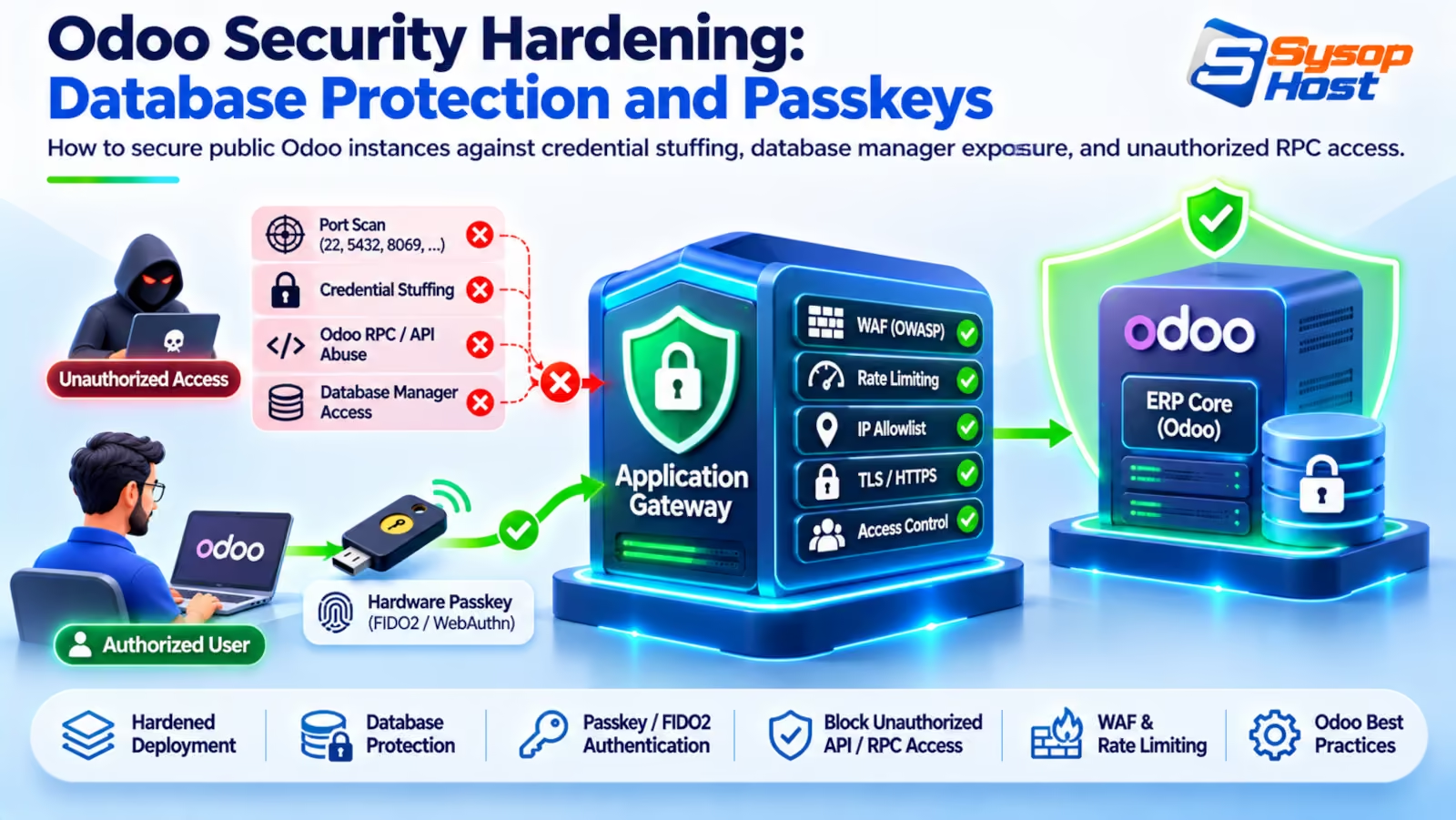
Deploying an enterprise ERP with an unhardened public address invites disaster. Automated crawlers scan for the default database manager, brute-force master passwords, and exploit open RPC interfaces. Follow this hardening guide to lock down endpoints, isolate database operations, and enforce hardware passkey authentication.
A business owner connects their new ERP server directly to a public IP address, sets up employee accounts, and leaves the office for the evening. By midnight, an automated scanner based in an overseas datacenter has already identified the open port, located the /web/database/manager URI, and started trying dictionaries of default master passwords.
If the attacker succeeds, they can download a raw SQL dump containing every customer address, employee salary, and bank routing record in under two minutes.
Odoo ships with conveniences that make a demo easy and a production deployment dangerous. Odoo security hardening is the work of turning those off before a scanner finds them. Odoo is a rich business suite combining accounting, customer relationships, e-commerce, and point of sale. By default, several administrative convenience features remain enabled to simplify early testing [1].
Leaving those defaults active on a public server exposes core financial records to automated botnets. Locking down database management endpoints, isolating remote procedure calls, enforcing rate limits, and mandating hardware passkeys converts a vulnerable default install into a defensible enterprise bastion.
The default Odoo attack surface exposed to the web
When Odoo boots without security hardening, the application presents several entry points to external port scanners:
The Public Database Selector (
/web/database/selector): Lists all active database names running on the PostgreSQL cluster. Knowing the database name gives an attacker the primary argument needed to launch credential stuffing attacks against user logins.The Database Manager (
/web/database/manager): Allows anyone with knowledge of the master password (admin_passwd) to create, duplicate, back up, or permanently drop production databases directly from a web browser.Open XML-RPC and JSON-RPC Endpoints (
/xmlrpc/2/commonand/xmlrpc/2/object): Exposes programmatic API gateways where automated scripts can test thousands of password guesses per minute without triggering standard web form rate limits.Cleartext master password in
odoo.conf: Nothing forcesadmin_passwdto be a hash. Plenty of installs still carry the plaintext string, and anyone who can read the file — or a backup of it — owns every database on the host.
Target Endpoint | Default Role in Odoo | Threat Vector | Exposure Risk |
|---|---|---|---|
| Web creation and snapshot utility | Master password brute-force and deletion | Critical |
| Lists active PostgreSQL database names | Database enumeration for targeted attacks | High |
| Programmatic authentication gateway | High-velocity automated password stuffing | High |
| JSON API endpoint for external tools | Remote method execution and data scraping | High |
Hardening is the discipline of closing these administrative doors so that external users interact only with the authenticated business portal.
Locking down the database manager and master credentials
The first line of defense is removing the database management interface from the public web.
1. Disable the database selector in odoo.conf
Edit your server configuration file (/etc/odoo/odoo.conf) and apply these parameters:
[options]
; Disable the public web database manager and selector
list_db = False

; Explicitly define the single active database for this host
db_name = production_odoo

; Set a strong hashed master password
admin_passwd = $pbkdf2-sha512$25000$YourLongGeneratedSaltHere$HashResult...
list_db = False: Completely hides the database selection menu. When users visit the root domain, Odoo routes them directly to the login screen ofproduction_odoowithout revealing other tenant names or database lists.db_name = production_odoo: Prevents dynamic database routing based on subdomains or headers.
2. Generate a secure PBKDF2 master password hash
Never store a plain text password in admin_passwd. Generate a cryptographic hash using Odoo's internal hashing utility:
# Generate a PBKDF2-SHA512 hash using Python
python3 -c "from passlib.context import CryptContext; print(CryptContext(schemes=['pbkdf2_sha512']).hash('YourSecureMasterPasswordPhrase!2026'))"
Paste the resulting $pbkdf2-sha512$... string into admin_passwd in odoo.conf. Set strict file permissions so only the odoo system user can read the file:
chmod 600 /etc/odoo/odoo.conf
chown odoo:odoo /etc/odoo/odoo.conf
3. Block database URIs at the Nginx reverse proxy
Even with list_db = False, add a defense-in-depth rule at the Nginx layer:
# Block all external access to database management endpoints
location ~* /web/database/ {
    allow 10.10.0.0/16;   # Trusted internal VPN only
    deny all;

    # Required, or allowed admins hit a 404 instead of the manager
    proxy_pass http://127.0.0.1:8069;
    proxy_set_header X-Forwarded-Host $host;
    proxy_set_header X-Forwarded-Proto $scheme;
}
This returns an immediate HTTP 403 Forbidden to any external scanner attempting to access database creation or snapshot utilities, while your own VPN still reaches the manager.
A word on what that rule is actually worth: list_db = False is the control that matters. The Nginx block is a second fence. A regex location without proxy_pass doesn't proxy anything; it just falls through to the document root.
Securing XML-RPC and JSON-RPC API interfaces
Odoo includes built-in Remote Procedure Call (RPC) interfaces designed for mobile apps, external e-commerce integrations, and shipping connectors.
Because these endpoints do not enforce CAPTCHAs, attackers use them to execute distributed credential stuffing attacks. A botnet rotating across thousands of residential IP addresses can test twenty password attempts per second against administrative accounts.
To neutralize this threat, configure Nginx to distinguish between human browser traffic and API calls. Standard web pages pass through standard HTTPS filters, while API endpoints face strict rate-limiting thresholds or explicit IP whitelists.
Enforcing rate limiting on RPC endpoints
Configure dedicated rate-limiting zones in Nginx to throttle API connection bursts:
# Define rate limiting zones in /etc/nginx/nginx.conf
limit_req_zone $binary_remote_addr zone=odoo_login:10m rate=5r/m;
limit_req_zone $binary_remote_addr zone=odoo_rpc:10m rate=30r/m;

# Inside your server block:
location ~* ^/(xmlrpc|jsonrpc) {
    limit_req zone=odoo_rpc burst=10 nodelay;
    proxy_pass http://127.0.0.1:8069;
    proxy_set_header X-Forwarded-Host $host;
    proxy_set_header X-Forwarded-For $proxy_add_x_forwarded_for;
    proxy_set_header X-Forwarded-Proto $scheme;
}

location = /web/login {
    limit_req zone=odoo_login burst=5 nodelay;
    proxy_pass http://127.0.0.1:8069;
    proxy_set_header X-Forwarded-Host $host;
    proxy_set_header X-Forwarded-For $proxy_add_x_forwarded_for;
    proxy_set_header X-Forwarded-Proto $scheme;
}
This lets ordinary users log in while capping automated guessing. Be precise about the guarantee: burst=5 nodelay admits five requests instantly, then refills at five per minute, so a stuffing run gets five tries up front rather than none. Tighten burst to 2 if your users can tolerate it.
For organizations requiring active monitoring and perimeter defense, pairing these rules with cybersecurity services and strategies from our website security guide keeps infrastructure resilient against evolving exploit scripts.
Enforcing passkeys and WebAuthn hardware authentication
Passwords are the weakest link in enterprise ERP security. People reuse them across personal accounts, write them on desk notes, and fall for targeted spear-phishing. You can't train that away.
Modern Odoo releases incorporate native support for passkeys and WebAuthn [2].
Why passkeys eliminate credential theft
Passkeys replace shared secrets with public-key cryptography:
The user's device (a YubiKey, Apple Touch ID, or Windows Hello sensor) generates a cryptographic key pair specific to your ERP domain (
erp.yourcompany.com).The private key never leaves the secure hardware chip on the user's physical device.
The Odoo server stores only the public key. During authentication, Odoo issues a cryptographic challenge that only the hardware chip can sign.
Because passkeys are cryptographically bound to the specific domain, a phishing site hosted on erp-yourc0mpany.com cannot capture or replay the authentication signature.
Security Control | Traditional Password | Time-based OTP (SMS / App) | Hardware Passkey (FIDO2 / WebAuthn) |
|---|---|---|---|
Phishing Resistance | None (easily captured by fake portals) | Vulnerable to real-time reverse proxies | Immune (cryptographically bound to domain) |
Credential Replay Risk | High (stolen passwords work anywhere) | Low (token expires in 30 seconds) | Zero (cannot be extracted from device) |
Brute-Force Risk | High (susceptible to dictionary attacks) | Low (rate-limited token window) | Zero (requires private key signature) |
Employee Convenience | Low (requires complex memorization) | Moderate (typing 6-digit codes) | High (single biometric touch or tap) |
Activating passkeys in Odoo
To mandate passkeys across your organization:
Open
Settings -> Users & Companiesand search for "passkey". The menu layout moved between 18 and 19, so trust the search box over a blog screenshot.Enable passkey authentication alongside TOTP.
Require all users with administrative or financial rights (Accounting, Sales Manager, Inventory Admin) to register a hardware security key.
Disable fallback to SMS verification, which is susceptible to SIM-swapping exploits.
Deploying on isolated dedicated server hosting ensures that security keys communicate with dedicated server daemons rather than shared multi-tenant proxy gateways.
Operating system hardening: mounts and privilege isolation
Application security depends on the integrity of the underlying Linux operating system. If an attacker discovers a remote code execution vulnerability in a third-party Odoo addon, OS-level hardening determines whether they gain a restricted sandbox or full root control.
Follow these Linux system hardening rules:
1. Never run Odoo as the root user
Odoo must run under a dedicated, unprivileged system user with no interactive shell access:
# Create dedicated system user with no login shell
useradd -r -s /bin/false -d /var/lib/odoo odoo
2. Restrict file permissions on custom addons
Ensure that the Odoo daemon cannot modify its own source code. If an attacker exploits an upload script, they should not be permitted to overwrite Python files:
# Set ownership to root for application code
chown -R root:root /opt/odoo/odoo-server
chmod -R 755 /opt/odoo/odoo-server

# Set odoo ownership strictly on the filestore directory
chown -R odoo:odoo /var/lib/odoo/.local/share/Odoo/filestore
chmod -R 700 /var/lib/odoo/.local/share/Odoo/filestore
3. Mount scratch directories with noexec
In /etc/fstab, ensure that temporary directories where untrusted files might be unpacked cannot execute binaries:
tmpfs  /tmp      tmpfs  rw,nosuid,nodev,noexec,relatime,size=1G   0 0
tmpfs  /dev/shm  tmpfs  rw,nosuid,nodev,noexec,relatime,size=512M 0 0
Setting noexec stops dropped web shells from executing out of temporary storage directories.
4. Restrict SSH access to cryptographic keys
Never permit password authentication on your management ports. Edit /etc/ssh/sshd_config.d/50-cloud-init.conf or the primary SSH daemon configuration:
PasswordAuthentication no
PermitRootLogin prohibit-password
KbdInteractiveAuthentication no
Pair this with an SSH listen port bound strictly to your internal management VPN or a restricted firewall rule. Disabling password-based administrative access stops brute-force scanners before they ever touch authentication daemons. Ensure that every systems engineer uses modern ed25519 key pairs, and review public keys in /home/odoo/.ssh/authorized_keys regularly to revoke access for departed employees.
Automated intrusion defense with CrowdSec
Standard host firewalls like UFW block static ports, but they can't tell a legitimate employee fat-fingering a password from a distributed brute-force scanner.
Deploying CrowdSec provides behavior-based intrusion detection:
Incoming Port 443 Requests
            │
            ▼
┌───────────────────────────────┐
│     CrowdSec Log Parser       │
│  - Reads Nginx access.log     │
│  - Tracks failed login patterns│
└───────────┬───────────────────┘
            │
            ├──► Legitimate User ─────────► Allowed
            │
            └──► Distributed Scanner ─────► Kernel-Level Drop via nftables Bouncer
CrowdSec reads
/var/log/nginx/access.login real time.When an IP address triggers multiple 401 or 403 errors across
/web/loginor/xmlrpc/, CrowdSec's local decision engine identifies an attack pattern.The CrowdSec firewall bouncer inserts a temporary drop rule into the Linux kernel packet filter (
nftables), blocking all traffic from that IP address for four hours [3].
By blocking attackers at the kernel layer, you prevent malicious traffic from consuming Python worker cycles, keeping your ERP fast and available for employees. For organizations operating on cloud hosting VPS, this intrusion defense runs efficiently in background memory.
Protect your enterprise ERP with hardened security infrastructure
SysopHost provides dedicated bare metal, managed cloud VPS, and managed cybersecurity services engineered to insulate your Odoo installation from credential stuffing and data breaches.
Explore Cybersecurity SolutionsComments
No comments yet. Be the first to comment!